


Feb
Ultimate Guide to API Integration for SMEs

Running a small or medium business means juggling multiple tools—your CRM, accounting software, e-commerce platform, email marketing, and more. Each day, your team manually enters the same customer data across different systems, copies order information from one platform to another and struggles to keep everything in sync.
What if these systems could talk to each other automatically?
That’s exactly what API integration does. It connects your business applications so data flows seamlessly between them, eliminating manual work and reducing errors. This comprehensive guide will show you how API integration for SMEs can transform your operations, even with limited budgets and small teams.
What is API Integration?
API stands for Application Programming Interface—essentially a bridge that allows different software applications to communicate with each other. When you integrate two or more applications via their APIs, they can automatically share data and trigger actions without human intervention.
Here’s a simple example: When a customer places an order on your Shopify store, API integration can automatically:
- Create an invoice in QuickBooks
- Update inventory levels in your warehouse system
- Add the customer to your email marketing list
- Generate a shipping label in ShipStation
- Send a confirmation email through your CRM
All of this happens in seconds, without anyone on your team lifting a finger.
Why Small Businesses Need API Integration
Save Valuable Time
Your team probably spends hours each week on repetitive tasks—copying data between systems, updating spreadsheets, or manually syncing customer information. Small business automation through APIs can eliminate 70-80% of this manual work, freeing your team to focus on activities that actually grow your business.
Reduce Costly Errors
Manual data entry inevitably leads to mistakes. A typo in a customer address, an incorrect inventory count, or a missed order can damage your reputation and cost money. API integration solutions ensure data accuracy by eliminating the human error factor.
Scale Without Hiring
As your business grows, you can’t keep adding staff to handle increased data management. Business API integration allows you to handle 10x more orders, customers, or transactions with the same team size.
Compete with Bigger Players
Enterprise companies have IT departments building custom integrations. Modern API integration platforms give small businesses access to the same automation capabilities at affordable prices, leveling the competitive playing field.
Make Better Decisions
When all your business data is scattered across disconnected systems, getting a clear picture of your business performance is nearly impossible. Integration creates a unified view of your operations, enabling data-driven decision-making.
Understanding Different Types of APIs
REST APIs
The most common type of API, REST (Representational State Transfer) uses standard web protocols to exchange data. Most modern business applications use REST APIs because they’re simple, flexible, and work well with web and mobile apps.
SOAP APIs
Older but still widely used in enterprise systems, SOAP (Simple Object Access Protocol) APIs are more rigid but offer stronger security features. You’ll encounter these when integrating with banking systems or legacy enterprise software.
GraphQL
A newer approach that allows you to request exactly the data you need, nothing more. GraphQL is gaining popularity because it’s efficient and reduces unnecessary data transfer.
Webhooks
While not technically APIs, webhooks work alongside them to push real-time notifications when specific events occur. For example, a webhook can notify your system the moment a payment is received.
Popular API Integration Platforms for Small Businesses
Zapier
The most user-friendly option for non-technical teams, Zapier connects over 5,000 applications with simple “if this, then that” logic. Pricing starts free for basic workflows, with paid plans from $19.99/month.
Best for: Businesses with no technical staff who need quick, simple integrations.
Make (formerly Integromat)
Offers more advanced features than Zapier with a visual workflow builder. You can create complex multi-step processes with conditional logic, loops, and data transformation. Plans start at $9/month.
Best for: Growing businesses that need more sophisticated automation but still want a no-code solution.
Microsoft Power Automate
Included with many Microsoft 365 subscriptions, Power Automate seamlessly integrates with Microsoft products and hundreds of third-party apps. Native integration with Office, Teams, and Outlook makes it powerful for businesses already in the Microsoft ecosystem.
Best for: Companies using Microsoft 365 who want deep integration with their existing tools.
Integrate.io
More robust than the others, Integrate.io specialises in data transformation and ETL (Extract, Transform, Load) processes. It’s particularly strong for businesses handling large data volumes or complex data transformations.
Best for: Data-intensive businesses with more technical requirements.
IFTTT
The most budget-friendly option at just $5/month (or free for basic use), IFTTT works well for simple automations. However, it’s limited in business features compared to dedicated platforms.
Best for: Very small businesses or solopreneurs just starting with automation.
Real-World Examples: How Businesses Use API Integration
E-commerce Retailer (15 employees)
A boutique clothing store integrated their Shopify store with QuickBooks accounting and ShipStation for shipping. Results:
- Order processing time reduced from 30 minutes to 2 minutes per order
- 95% reduction in shipping errors
- 12 hours per week saved on administrative tasks
- Real-time inventory visibility across online and retail locations
Marketing Agency (8 employees)
An agency connected HubSpot CRM with their project management tool (Asana), email platform (Gmail), and billing system (FreshBooks). Impact:
- Client onboarding automated from 2 hours to 15 minutes
- Project creation triggered automatically from new client signups
- Time tracking synchronised with billing for accurate invoicing
- Client communication automatically logged in CRM
Healthcare Clinic (3 doctors, 5 staff)
A medical practice integrated their appointment scheduling system with billing software and patient communication platform. Outcomes:
- Appointment reminders automated, reducing no-shows by 60%
- Patient intake forms automatically added to medical records
- Insurance verification completed before appointments
- 10 hours per week saved on administrative work
Manufacturing Business (35 employees)
A small manufacturer connected their custom inventory system with Salesforce CRM and automated their email marketing. Benefits:
- Sales team gained real-time visibility into production capacity
- Automated reorder alerts prevented stockouts
- Customer purchase cycle triggered personalised marketing campaigns
- Customer satisfaction increased by 40%
Step-by-Step: Implementing API Integration in Your Business
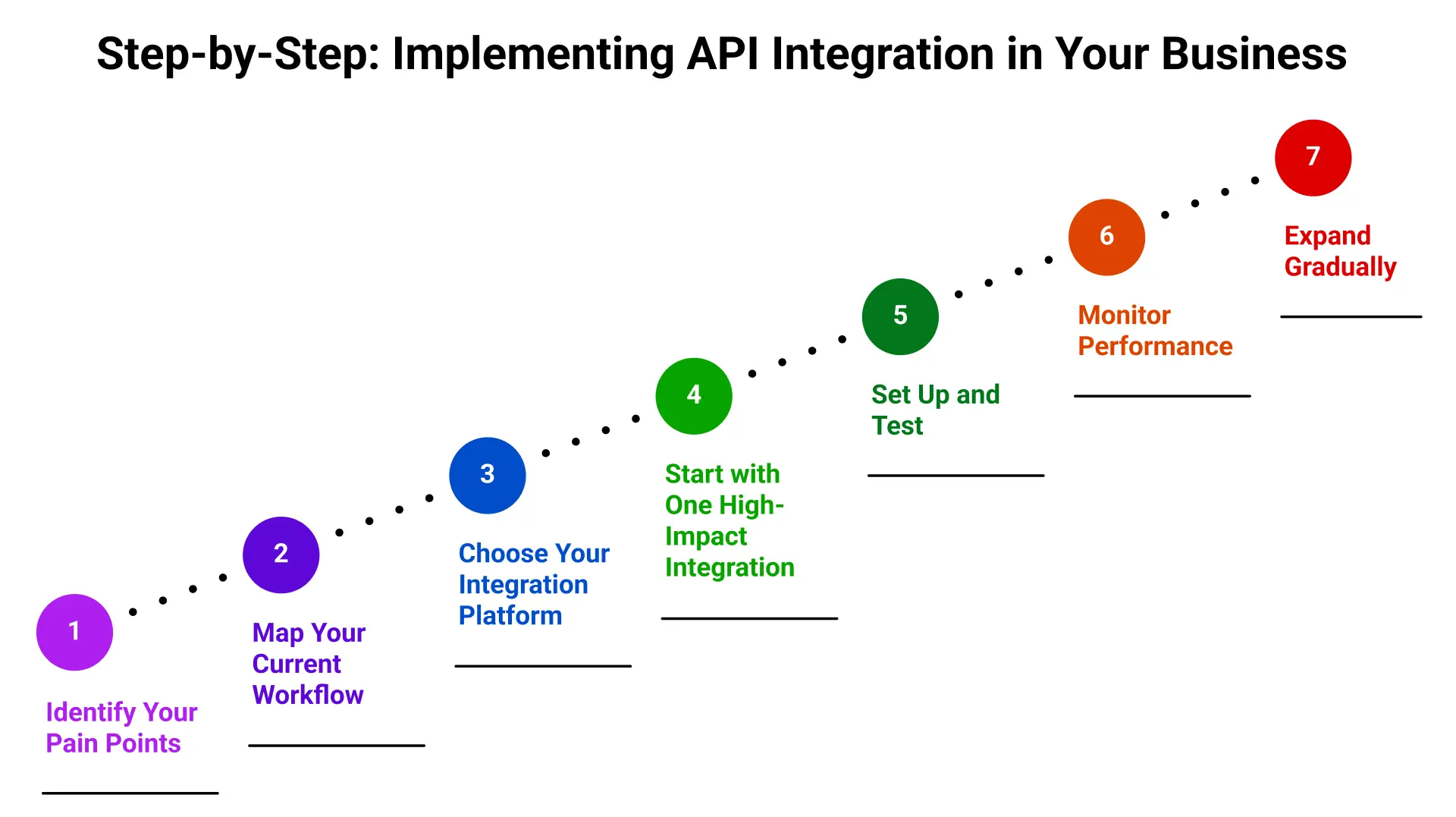
Step 1: Identify Your Pain Points
Start by asking your team these questions:
- What repetitive tasks consume the most time?
- Where do we frequently encounter data entry errors?
- Which systems need to share information?
- What manual processes slow down our customer service?
Common answers include:
- Manually entering orders from e-commerce into accounting
- Copying customer information between CRM and email marketing
- Updating inventory across multiple sales channels
- Creating invoices from completed projects
Step 2: Map Your Current Workflow
Document how data currently flows (or doesn’t flow) between your systems. Create a simple diagram showing:
- Which applications you use
- How data moves between them
- Where manual steps occur
- What information gets duplicated
Step 3: Choose Your Integration Platform
Consider these factors:
- Technical skill level: No coding experience? Choose Zapier or IFTTT
- Budget: Starting small? Free tiers work for basic needs
- Complexity: Need advanced logic? Consider Make or Power Automate
- Existing tools: Using Microsoft 365? Power Automate is included
Step 4: Start with One High-Impact Integration
Don’t try to automate everything at once. Choose one integration that will:
- Save the most time, or
- Eliminate the most errors, or
- Improve customer experience most significantly
Popular first integrations:
- E-commerce → Accounting software
- CRM → Email marketing platform
- Customer support → CRM system
- Payment processor → Invoicing software
Step 5: Set Up and Test
Most API integration platforms offer templates for common integrations. Here’s the typical setup process:
- Connect your accounts (usually by logging in and authorising access)
- Choose your trigger (what event starts the automation)
- Map your data fields (which information goes where)
- Add any transformations (formatting dates, combining fields, etc.)
- Test with sample data before going live
Step 6: Monitor Performance
After launching your integration:
- Set up error notifications to catch issues immediately
- Review logs weekly for the first month
- Ask your team for feedback on what’s working
- Track time saved and errors reduced
Step 7: Expand Gradually
Once your first integration is running smoothly, add another. Most businesses find they can implement 2-3 integrations per month without overwhelming their team.
Best Practices for Successful Integration
Prioritise Security
Choose platforms with:
- SOC 2 or ISO 27001 certification
- Data encryption in transit and at rest
- Two-factor authentication
- Regular security audits
Never share API keys publicly or store them in unsecured locations.
Document Your Integrations
Create simple documentation including:
- What systems are connected
- What data flows between them
- Who set up the integration
- When it was last updated
- Who to contact if problems arise
Plan for Growth
Select platforms that scale with your business. Consider:
- Can you add more workflows as needed?
- Are there limits on the number of operations?
- How much does pricing increase with growth?
- Can the platform handle increased data volumes?
Train Your Team
Even automated systems require human oversight. Ensure your team understands:
- What’s being automated
- What still requires manual work
- How to spot integration errors
- Who handles troubleshooting
Budget for Ongoing Costs
API integration solutions typically charge monthly fees based on:
- Number of workflows/integrations
- Volume of operations (tasks per month)
- Premium features used
- Number of users
Factor these costs into your operational budget as essential business expenses.
Overcoming Common Challenges
“We’re not technical enough for this”
Modern API integration platforms are specifically designed for non-technical users. If you can use a spreadsheet, you can set up basic integrations. Most platforms offer:
- Pre-built templates
- Visual workflow builders
- Step-by-step tutorials
- Live chat support
“It seems expensive”
Calculate the real cost of manual work. If one employee spends 10 hours per week on data entry at $25/hour, that’s $13,000 annually. A $100/month integration platform costs $1,200/year—nearly 11x less expensive.
“What if something breaks?”
Choose established platforms with:
- Automatic error detection
- Detailed activity logs
- Rollback capabilities
- Responsive customer support
Start with non-critical integrations to build confidence before automating mission-critical processes.
“Our systems might not be compatible”
Most popular business applications offer APIs or have built-in integrations with major platforms. Check your software provider’s integrations page, or search “[Your Software] + [Integration Platform]” to verify compatibility.
Measuring ROI from API Integration
Track these metrics to demonstrate value:
Time Savings
- Hours per week saved on manual tasks
- Reduction in time-to-complete processes
- Faster customer response times
Error Reduction
- Decrease in data entry mistakes
- Fewer customer complaints about incorrect information
- Reduced time spent fixing errors
Cost Savings
- Manual labor hours eliminated
- Reduction in errors that cost money
- Avoided hiring for administrative tasks
Business Growth
- Increased capacity to handle customers/orders
- Ability to launch new products or services faster
- Improved customer satisfaction scores
The Future of Business API Integration
Several trends are making integration even more accessible:
AI-Powered Automation: Next-generation platforms use artificial intelligence to suggest optimisation opportunities and automatically adjust workflows based on usage patterns.
Industry-Specific Solutions: Pre-packaged integration bundles tailored for specific industries (retail, healthcare, professional services) are becoming more common.
Low-Code Development: The line between no-code and custom development is blurring, with platforms offering both visual builders and code access for advanced users.
Mobile-First Management: As teams become more distributed, integration platforms are prioritising mobile apps for monitoring and managing workflows on the go.
Conclusion: Your Next Steps
API integration for SMEs isn’t about technology for technology’s sake—it’s about giving your small team superpowers. By connecting your essential business systems, you eliminate tedious work, reduce costly mistakes, and enable your team to focus on what really matters: serving customers and growing your business.
The barrier to entry has never been lower. With free and affordable platforms, intuitive interfaces, and thousands of pre-built integrations, any business can start automating today.
Here’s your action plan:
- This week: Identify your most time-consuming manual process
- Next week: Sign up for a free account on Zapier or Make
- Within a month: Implement your first integration
- Ongoing: Add 1-2 new integrations per month
Remember, you don’t need to automate everything at once. Start small, prove the value, and build from there. The businesses that thrive in the coming years will be those that leverage technology to multiply the effectiveness of their teams.
Ready to transform your operations? Your journey to small business automation begins with a single integration. Choose one pain point, select a platform, and take the first step today.
The competitive advantages of API integration are too significant to ignore. Your competitors are already automating—make sure you’re not left behind.

Nihal Rajput is the Operations Director at Ficode Software Solutions Pvt. Ltd., where he oversees day-to-day operations, streamlines processes, and drives organisational efficiency. With a focus on delivering scalable solutions and maintaining operational excellence, he plays a key role in aligning teams, optimising resources, and ensuring client satisfaction as the company grows.
 Previous
 Next
Next