


Aug
Building a Secure and Scalable AWS Cloud Architecture – Complete Guide
Modern applications are rapidly moving toward AWS Cloud Architecture, but most systems are not designed with proper security and scalability in mind. Teams often focus on deployment speed instead of architecture quality.
In real-world AWS cloud environments, this leads to issues like exposed endpoints, weak IAM policies, and lack of centralised monitoring. These problems usually appear later when systems start scaling.
This guide explains a practical AWS cloud architecture design approach with a strong focus on security, scalability, and cost efficiency.
Understanding AWS Cloud Architecture
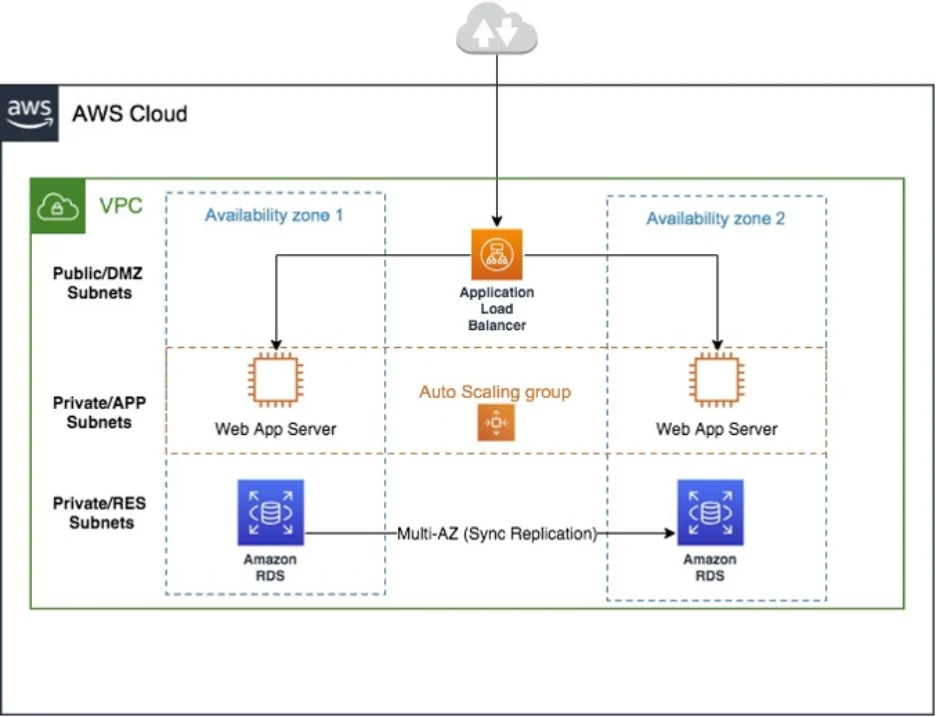
AWS Cloud Architecture is the structured design of applications using multiple cloud .
It defines how components interact, how data flows and how security is enforced across the system. A well-designed architecture ensures high availability, scalability and fault tolerance.
From an engineering perspective, it is not just about services – it is about designing resilient distributed systems on AWS.
Core AWS Cloud Services in Architecture
A production-ready system relies on multiple AWS services working together in layers.
1. Compute Layer
Compute services handle application processing and execution. AWS provides EC2, ECS, EKS and Lambda depending on workload type.
In modern architecture design, container-based or serverless approaches are preferred for better scalability and maintenance.
2. Networking Layer
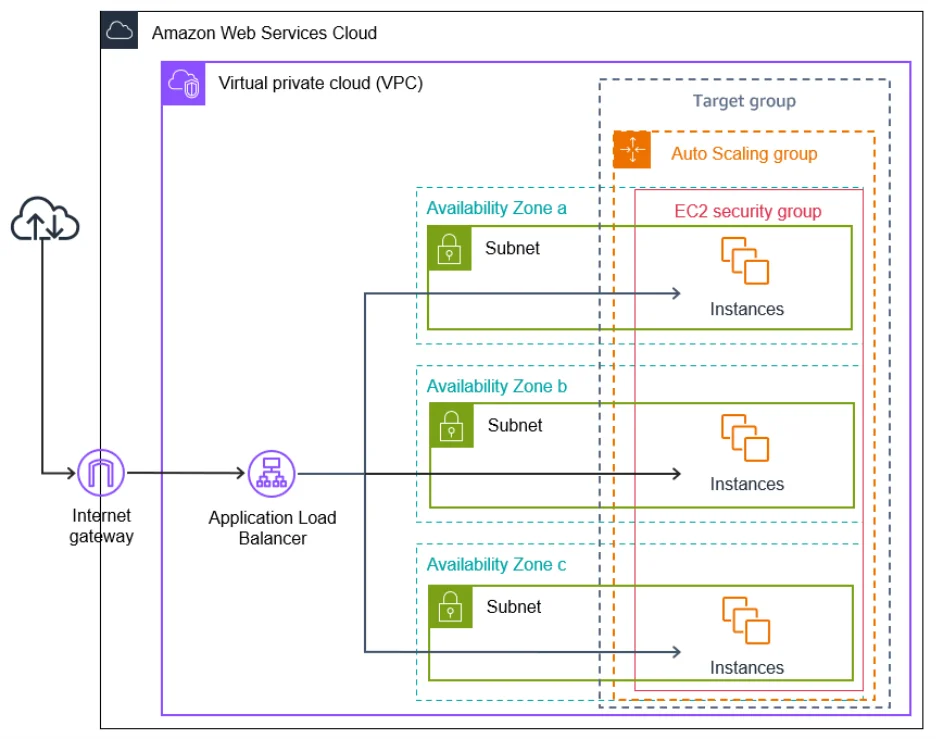
Networking defines how components communicate securely. A properly designed VPC separates public and private workloads.
Load balancers distribute traffic across multiple instances, ensuring high availability and fault tolerance in AWS architecture.
3. Storage Layer
Storage services like S3, EBS, and EFS handle structured and unstructured data.
A key AWS architecture best practice is to use lifecycle policies to move unused data to cheaper storage tiers for cost efficiency.
4. Security Layer
Security is a foundational layer in AWS architecture. It ensures protection across identity, network, and data layers.
AWS IAM, WAF, KMS and Security Hub collectively enforce access control threat protection, encryption, and monitoring.
AWS Security Architecture (Real-World Approach)
A secure AWS environment follows a multi-layered defense-in-depth model. Each layer protects the system independently.
Security is not a single service – it is a combination of IAM policies, network controls, encryption and monitoring systems working together.
Key Security Components in AWS
AWS IAM (Identity & Access Management)
IAM is the foundation of security. It controls who can access AWS resources and under what conditions.
In modern cloud architecture design IAM roles are preferred over static credentials for better security and scalability.
AWS WAF (Web Application Firewall)
AWS WAF protects applications from common web attacks such as SQL injection and XSS.
It works at the application layer and filters malicious traffic before it reaches backend services, strengthening AWS cloud security posture.
AWS Security Hub
Security Hub provides centralised visibility of security findings across AWS accounts and services.
It aggregates alerts, evaluates compliance standards and helps prioritise security issues in large-scale AWS cloud environments.
Supporting Security Services
| Service | Role in Architecture |
|---|---|
| AWS KMS | Encryption of sensitive data |
| Secrets Manager | Secure credential storage |
| Amazon Macie | Sensitive data discovery |
Real-World AWS Cloud Security Problem
In many real systems AWS environments start without proper architecture planning. This leads to weak security posture.
Common issues include IAM users with access keys public resources and missing monitoring systems in cloud services.
Over time these gaps create serious risks like unauthorised access and compliance failures.
Solution: Secure AWS Cloud Architecture Design
A structured approach to AWS Cloud architecture design solves these issues using layered security and automation.
1. IAM Modernisation
Static credentials are replaced with IAM roles and temporary credentials using AWS STS.
This improves security by eliminating long-term access keys and enforcing least privilege access.
2. AWS WAF Implementation
AWS WAF is configured using managed rule sets and custom rules for API protection.
It filters malicious traffic and reduces exposure to application-layer attacks in cloud services.
3. Centralised Monitoring with Security Hub
Security Hub integrates multiple services into a unified security dashboard.
It improves visibility, detects threats early, and supports compliance tracking across AWS architecture.
4. Secure Secrets Management
Hardcoded secrets are moved to AWS Secrets Manager with IAM-controlled access.
This reduces security risks and improves operational consistency in production environments.
AWS Cloud Architecture Overview
A production-grade architecture follows layered design principles:
- IAM -> Access control layer
- WAF -> Application protection layer
- Security Hub -> Monitoring layer
- KMS + Secrets Manager -> Data protection layer
This structure ensures scalability, resilience, and strong security implementation.
AWS Architecture Best Practices
Following AWS architecture best practices ensures long-term system stability.
- Use IAM roles instead of static users
- Enable multi-AZ deployments for high availability
- Use managed AWS cloud services wherever possible
- Implement centralised logging and monitoring
- Follow least privilege access principles
These practices significantly improve architecture reliability.
AWS Cost Optimisation Strategy
Cost management is a key part of scalable AWS systems.
Effective cost optimisation involves right-sizing resources using auto-scaling and leveraging reserved instances for predictable workloads.
Storage optimisation using S3 lifecycle policies also helps reduce long-term operational costs.
Before vs After Architecture
| Area | Before | After |
|---|---|---|
| Access Control | IAM Users | IAM Roles + STS |
| Security | Basic setup | Structured security architecture |
| Monitoring | None | CloudWatch |
| Secrets | Hardcoded | Secrets Manager |
| Cost Efficiency | High waste | Optimised cost usage |
Common Mistakes in AWS Cloud Architecture
Many failures in architecture design come from avoidable mistakes.
- Using access keys in application code
- Leaving S3 buckets public
- Ignoring AWS Security Hub alerts
- Over-permissioned IAM policies
- Lack of encryption in storage layers
Avoiding these improves AWS cloud security significantly.
When to Use Cloud Services
| Scenario | Recommended Setup |
|---|---|
| Small application | IAM + EC2 + S3 |
| Scalable system | Load Balancer + Auto Scaling |
| Enterprise architecture | Full AWS security architecture |
| Compliance systems | Security Hub + CloudTrail + KMS |
Conclusion
A strong AWS Cloud Architecture is not just about using AWS services – it is about designing systems that are secure, scalable, and cost-efficient.
By applying AWS services correctly along with AWS architecture best practices and cost optimisation techniques you can build a production-ready system.
A well-designed architecture ensures long-term stability, better performance, and strong security across all layers
Get Expert Help with AWS Cloud Architecture
Looking to build a secure and scalable AWS Cloud Architecture? Transform your cloud infrastructure with expert-driven solutions tailored to your business needs. Connect with Ficode today and let our experts help you design, implement, and optimise secure, scalable, and cost-efficient AWS solutions tailored to your business needs.
Frequently Asked Questions
AWS Cloud Architecture is the structured design of applications using AWS cloud services like EC2, S3, VPC, IAM, Lambda, and other managed services. It defines how different components interact to ensure scalability, security, and high availability.
AWS security includes IAM for identity management, WAF for application protection, KMS for encryption Secrets Manager for secure credential storage and Security Hub for centralized security monitoring.
Cost optimization is achieved using auto-scaling, right-sizing compute resources, reserved or spot instances and S3 lifecycle policies to efficiently manage storage and reduce unnecessary costs.
AWS architecture best practices include using IAM roles instead of static credentials, enabling multi-AZ deployments for high availability implementing centralized logging and monitoring and using managed cloud services for scalability and reliability.

Nihal Rajput is the Operations Director at Ficode Software Solutions Pvt. Ltd., where he oversees day-to-day operations, streamlines processes, and drives organisational efficiency. With a focus on delivering scalable solutions and maintaining operational excellence, he plays a key role in aligning teams, optimising resources, and ensuring client satisfaction as the company grows.

 Previous
 Next
Next