


Aug
How We Used Azure AI to Automate Meeting Notes
There’s a moment at the end of almost every meeting that most teams know too well. The call is wrapping up, someone asks “can you send the notes?” and everyone quietly hopes it falls on someone else.
Our team had the same problem. We tried shared documents, rotating note-takers, and Notion templates. Nothing stuck consistently. So, we decided to build an internal tool that handles it automatically. This post is a walkthrough of what we built, the tech stack we chose, and what we learned along the way.
The Problem We Wanted to Solve
Manual meeting notes are inconsistent. Different team members write them differently, important action items get buried or missed, and whoever is taking notes is only half-listening to the actual conversation.
We wanted a tool that would sit in the background during a meeting, transcribe everything in real time, and automatically produce a clean summary with decisions and action items already extracted the moment the call ended.
The Stack We Chose
We kept the architecture simple and focused. Four components, each doing one thing well:
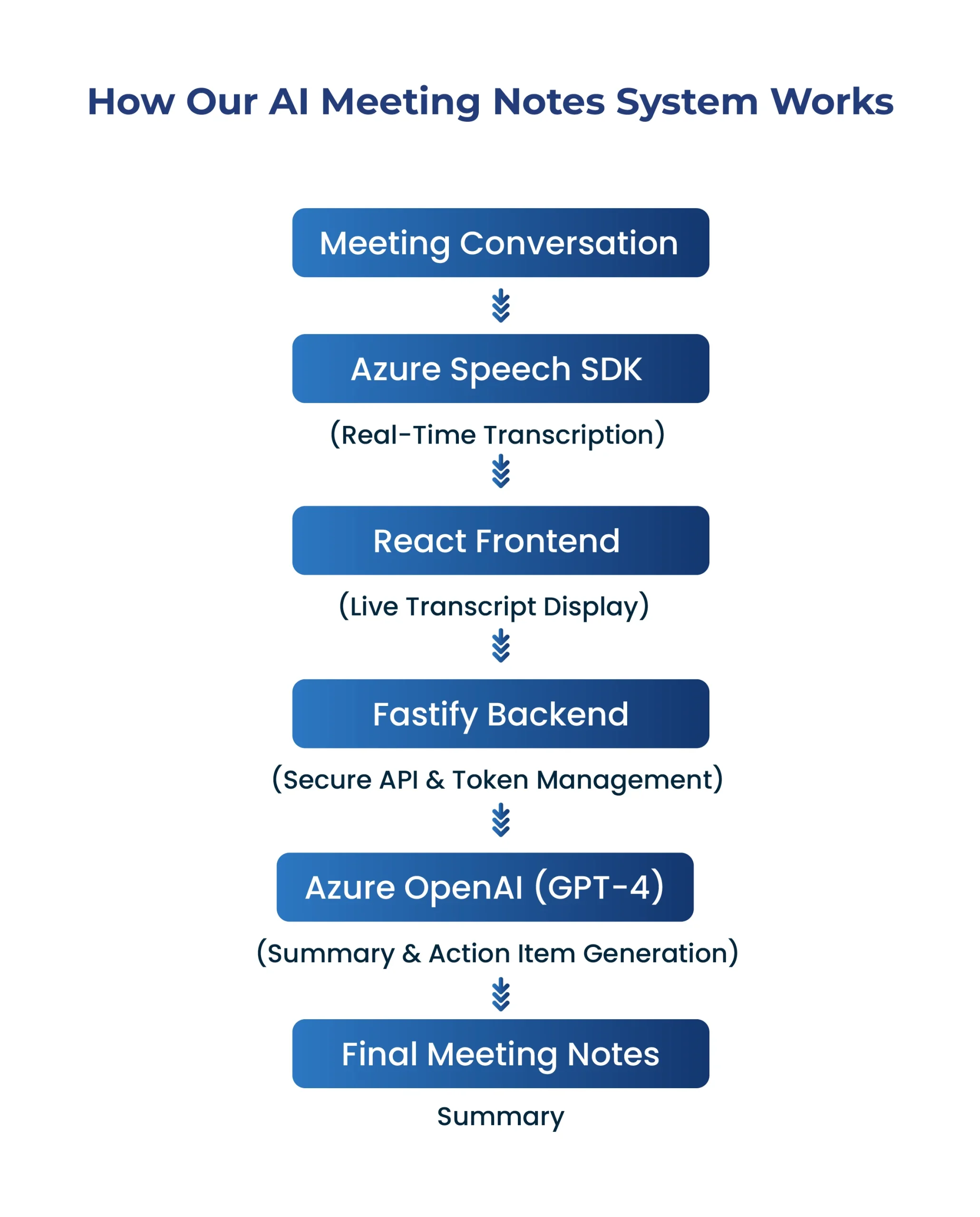
| Azure Speech SDK | real-time transcription running directly in the browser |
| React | frontend interface showing the live transcript as the meeting runs |
| Fastify | lightweight Node.js backend handling auth tokens and API calls |
| Azure OpenAI (GPT-4) | reads the full transcript and generates a structured summary |
The entire build took the team roughly a weekend of focused work. Most of that time was not spent on code, it was spent on getting the AI prompt right. More on that below.
How Our AI Meeting Notes System Works
Real-Time Transcription with Azure Speech SDK
Azure’s Speech SDK was easier to integrate than we expected. It runs directly in the browser with no server-side audio processing required. Once initialised, it calls startContinuousRecognitionAsync() and stays open for the full duration of the meeting, firing a callback each time it recognises a complete sentence.
Each recognised sentence is appended to React state and rendered on screen in real time. Participants can follow along and catch any misrecognition immediately. In a quiet environment with a decent microphone, accuracy is strong close to what a human transcriber would produce.
Security note: Azure credentials should never be exposed in the frontend.
We built a small Fastify endpoint that issues short-lived tokens instead the actual API key stays on the server at all times.
Learn More –Speech to text
The Backend – Keeping It Lean
The Fastify server has one job: act as a secure bridge between the browser and Azure. It issues Speech SDK tokens to the frontend and forwards the final transcript to Azure OpenAI when the meeting ends.
We chose Fastify over Express for its performance and built-in schema validation. For an internal tool that the whole team uses daily, response time and reliability both matter. Fastify delivered on both.
The Part That Made the Biggest Difference – The Prompt
This is something we did not fully anticipate going in: the quality of the AI summary has almost nothing to do with the code and everything to do with how you instruct the model.
A vague prompt like “summarise this meeting” produces a vague summary. We invested time crafting a structured system prompt that asks the model for three specific outputs: a short executive summary at the top, a list of decisions that were made, and a numbered action list with the responsible person’s name attached wherever someone made a commitment during the call.
That last part is where the tool earns its value. If a team member says “I’ll send the updated proposal by Thursday” in the middle of an hour-long call, the model picks it up and puts it in the action list. In manual notes, those casual commitments disappear all the time.
Results After One Month
We have been running this tool internally for about a month. The team now uses it on almost every call.
In our internal testing, the system produced useful first-draft notes, although accuracy varied depending on audio quality, accents, overlapping speech and domain-specific terminology.
An unexpected benefit: team members participate more actively in meetings now. When everyone knows that notes are being handled automatically, attention is fully on the conversation rather than split between listening and writing. The quality of discussion has noticeably improved.
Ready to Stop Taking Meeting Notes Manually?
Every meeting generates valuable insights, decisions, and action items but capturing them manually is time-consuming and often inconsistent.
With AI-powered meeting note automation, your team can focus on meaningful discussions while intelligent transcription and summarisation handle the documentation automatically.
Whether you’re managing client calls, internal standups, project reviews, or strategy sessions, AI Note Taker helps you:
Conclusion
Automating meeting notes is a small change that has a noticeable impact on how a team operates. The technology to do it well is accessible today Azure’s speech and language services are reliable, the code surface is small, and the problem it solves is one that every team deals with.
If your team is spending time every week writing up meeting notes, this kind of tool is worth exploring. The hardest part is not the engineering it’s giving the model clear enough instructions to produce output your team actually trusts and uses.
We will continue iterating on this as part of our internal productivity stack. If you have questions about the implementation or want to share how your team is solving a similar problem, we’d love to hear from you.
Frequently Asked Questions
Azure AI combines speech recognition and large language models to transcribe conversations and generate structured meeting summaries automatically.
In quiet environments with good microphones, Azure Speech SDK can achieve high transcription accuracy suitable for business meetings.
Yes. GPT-4 can analyse transcripts and extract decisions, tasks, deadlines, and responsibilities when prompted correctly.
Yes. Organizations can keep API keys secure using backend token services and leverage Azure’s enterprise-grade security features.
AI-generated notes save time, improve consistency, capture action items automatically, and allow participants to focus on discussions rather than manual note-taking.

Nihal Rajput is the Operations Director at Ficode Software Solutions Pvt. Ltd., where he oversees day-to-day operations, streamlines processes, and drives organisational efficiency. With a focus on delivering scalable solutions and maintaining operational excellence, he plays a key role in aligning teams, optimising resources, and ensuring client satisfaction as the company grows.
 Previous
 Next
Next