



Dec
Best API Integration Practices for Seamless Business Automation
In today’s digital age, API Integration Practices play a critical role in API integration for business automation, helping businesses streamline processes, reduce manual tasks, and improve operational efficiency. By integrating APIs (Application Programming Interfaces), businesses can connect various software applications, automate workflows, and optimize their overall performance. However, to truly achieve seamless integration, it’s crucial to follow best practices that ensure smooth, secure, and scalable operations.
In this blog, we’ll explore the best API integration practices that can help your business successfully automate its processes while minimizing risks and enhancing productivity.
1. Define Clear Objectives for API Integration Practices
Before embarking on any API integration strategy, it’s important to define your business objectives. What are you aiming to automate? Is it customer relationship management (CRM), inventory tracking, or financial reporting? By clearly outlining the goals of automation, you can select the right APIs and integration approach that aligns with your business needs.
Why This Matters:
A clear understanding of the objectives helps ensure that the API integration is aligned with your core business goals, leading to business process automation that actually delivers value. Whether you need real-time data sharing or enhanced customer experience, your integration should support these objectives seamlessly.
2. Choose Scalable API Solutions
As your business grows, so will your integration needs. To ensure long-term success, it’s essential to choose API solutions that are scalable and adaptable to changes in your business environment. APIs should be able to handle increasing data volume, user activity, and changing business requirements without compromising performance.
Key Considerations for Scalability:
- Modular API Architecture: This allows you to add new services and features without disrupting the entire system.
- Load Balancing: Proper distribution of requests ensures that no single server is overwhelmed, maintaining system speed and reliability.
By planning for scalability from the start, your business can enjoy seamless API integration even as it expands.
Adopting scalable API Integration Practices ensures that your automation framework can evolve alongside growing business demands without performance issues.
3. Ensure Secure API Integration
One of the most critical aspects of API integration is security. APIs often carry sensitive business data, and any security vulnerabilities can lead to breaches, data loss, and compliance issues. Implementing robust security measures is non-negotiable for seamless API integration.
Best Practices for API Security:
- Authentication and Authorization: Use OAuth, API keys, or JWT tokens to authenticate API users and ensure that only authorized personnel have access to specific data or functions.
- Data Encryption: Encrypt data both in transit and at rest to protect it from unauthorized access.
- Rate Limiting and Throttling: Implement these mechanisms to prevent abuse of your API, ensuring that it can handle traffic spikes without crashing.
By prioritizing API security best practices, you can safeguard your business’s sensitive data while ensuring smooth, uninterrupted API operations.
4. Ensure Seamless Integration with User-Friendly Tools
One of the main goals of business process automation is to make workflows smoother for the user. Choose tools and platforms that make it easy to integrate your APIs without requiring deep technical expertise. Look for user-friendly APIs and integration platforms that simplify the process for your team, ensuring that the focus remains on delivering business value, not on complex code.
Integration Platforms to Consider:
- Zapier: Great for non-technical teams to automate workflows between apps.
- MuleSoft: Provides enterprise-level integration solutions, especially for large businesses.
- Postman: For testing and debugging APIs to ensure that they work seamlessly before going live.
Following well-defined API Integration Practices when using integration tools helps teams automate workflows efficiently without introducing technical complexity.
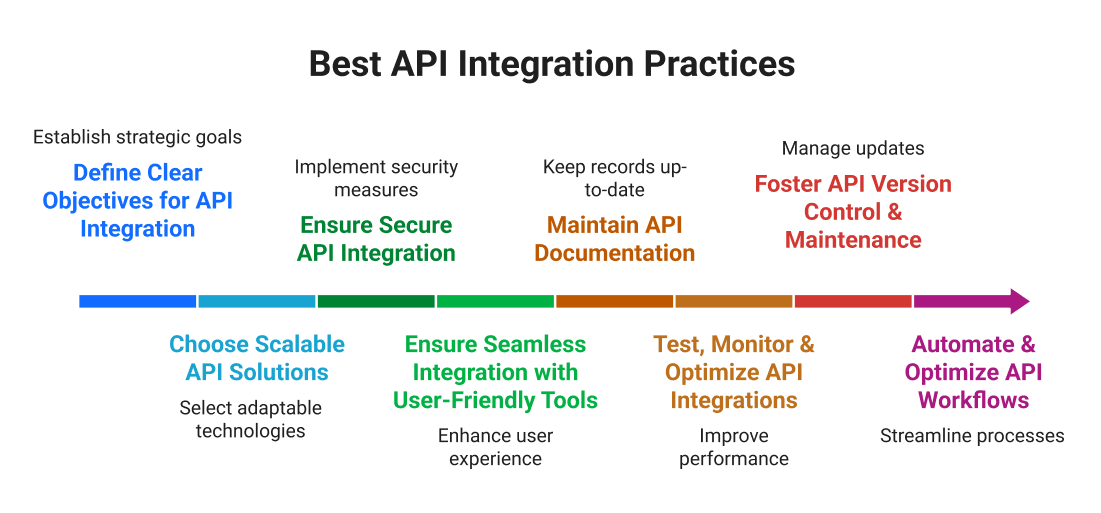
5. Maintain API Documentation
Clear, comprehensive documentation is a vital part of any successful API integration strategy. It provides a roadmap for internal teams and external partners to understand how APIs work, how they are connected, and how to troubleshoot any potential issues.
What Should API Documentation Include?
- API Endpoint Details: Clear descriptions of each endpoint and the functions it supports.
- Data Mapping: Information on how data flows between different systems.
- Error Handling: Guidelines on how to manage errors and exceptions.
- Security Measures: Details on how security protocols are implemented.
Well-documented APIs ensure that your integration is easier to manage and scale, and it minimizes confusion or mistakes during the development process.
6. Test, Monitor, and Optimize API Integrations
Once you’ve implemented your API integrations, testing and monitoring are crucial to ensure they work as expected. Continuous monitoring also helps detect issues early, allowing you to address them before they affect the business.
Testing Best Practices:
- Unit Testing: Ensure individual API components work correctly.
- Integration Testing: Validate that all APIs and services interact seamlessly with each other.
- Performance Testing: Simulate high traffic to ensure that your system can handle load spikes.
Monitoring Best Practices:
- Real-time Monitoring Tools: Use platforms like New Relic, Datadog, or Prometheus to monitor your API performance and identify issues quickly.
- Alerts and Notifications: Set up alerts for system downtime, API errors, or unusual activity.
Regularly optimizing your API performance by addressing any detected issues and improving the integration will lead to a more efficient, reliable system.
7. Foster API Version Control and Maintenance
As business needs evolve, so should your API integrations. API versioning ensures that older versions of the API remain functional while new features and improvements are implemented. This practice helps prevent disruptions in service and allows businesses to make updates without affecting ongoing operations.
Strong API Integration Practices such as version control and backward compatibility help businesses update systems without disrupting existing operations.
Key Maintenance Strategies:
- Versioning: Use versioning in your API URLs to allow for updates without breaking existing functionality.
- Deprecation Plans: Set clear timelines for deprecating older versions, with ample notice for teams to transition to new versions.
- Backward Compatibility: Ensure that new API versions maintain compatibility with older ones, reducing the impact on users.
Version control and proper API maintenance are vital for keeping your integrations running smoothly as your business grows.
8. Automate and Optimize API Workflows
The primary goal of business process automation is to improve efficiency, and API integration can help achieve this goal by automating repetitive tasks. Once your API integrations are up and running, focus on continuously automating and optimizing workflows to save time, reduce manual errors, and improve productivity.
Examples of Workflow Automation:
- Data Synchronization: Automate the synchronization of data across different systems (e.g., syncing customer data between CRM and email marketing tools).
- Order Processing: Automatically process orders from your e-commerce platform to inventory management and shipping systems.
- Customer Support: Integrate APIs that automatically assign tickets or route inquiries to the appropriate teams.
By automating these workflows, you can streamline business processes, improve accuracy, and create a more efficient operation.
Conclusion
Implementing API integration for business automation is one of the most powerful ways to enhance efficiency, improve data flow, and streamline your everyday operations. By following the proven API integration practices – from defining objectives and prioritizing security to continuous testing and monitoring – you can build a smooth, scalable, and future-ready automation system.
If you’re looking to integrate APIs seamlessly or need expert guidance to automate your business processes, Ficode Technologies can help. Our experienced team specializes in delivering customised API solutions that simplify workflows, enhance security, and support your long-term growth.
Get in touch with Ficode today to start your automation journey with confidence.
Frequently Asked Questions
API integration for business automation is the process of connecting different software systems using APIs to automate workflows and data exchange. It allows businesses to reduce manual tasks, improve accuracy, and ensure real-time communication between applications such as CRM, ERP, accounting, and eCommerce platforms.
API integration enables business process automation by allowing systems to work together automatically. Tasks like data synchronization, order processing, invoicing, customer updates, and reporting can be completed without manual intervention, resulting in faster operations and improved efficiency.
Some of the best API integration practices include defining clear automation goals, using secure authentication methods, choosing scalable APIs, maintaining proper documentation, testing integrations thoroughly, and monitoring performance continuously. Following these practices ensures seamless API integration and long-term reliability.
Yes, API integration is secure when implemented correctly. Secure API integration uses encryption, authentication (such as OAuth or API keys), access control, and rate limiting to protect sensitive business data. Following API integration best practices helps minimize security risks while enabling automation.
Yes, many businesses choose professional API integration services to ensure reliable, secure, and scalable automation. Experts help design the right API integration strategy, avoid common errors, and implement seamless automation that supports growth and reduces operational risks.

Nihal Rajput is the Operations Director at Ficode Software Solutions Pvt. Ltd., where he oversees day-to-day operations, streamlines processes, and drives organisational efficiency. With a focus on delivering scalable solutions and maintaining operational excellence, he plays a key role in aligning teams, optimising resources, and ensuring client satisfaction as the company grows.
 Previous
 Next
Next