


Dec
Zero-Trust Security on AWS: Implementing Modern IAM and Deny Policies
Introduction: Why Zero-Trust Security Matters in 2025
The statistics are stark: 82% of data breaches involve human error, and the majority stem from over permissioned access. In traditional cloud environments, organizations grant broad IAM permissions hoping to “enable productivity,” only to discover they’ve inadvertently created pathways for attackers, insider threats, and compliance violations. The paradigm has shifted.
Zero-trust security on AWS represents a fundamental departure from the “trust the network perimeter” mentality. Instead, it asks a simple question: Why should we trust anyone or anything by default? The answer: we shouldn’t. By implementing AWS IAM best practices and leveraging explicit deny policies, organizations can reduce breach radius by 73% and detect 99% of unauthorized API calls before damage occurs.
This guide provides a practical, step-by-step blueprint for implementing zero-trust architecture on AWS, complete with working code, real case studies, and measurable results. Whether you’re a DevSecOps engineer struggling with IAM complexity or a security architect designing enterprise controls, you’ll find actionable insights here.
What is Zero-Trust Architecture? Understanding the Fundamentals
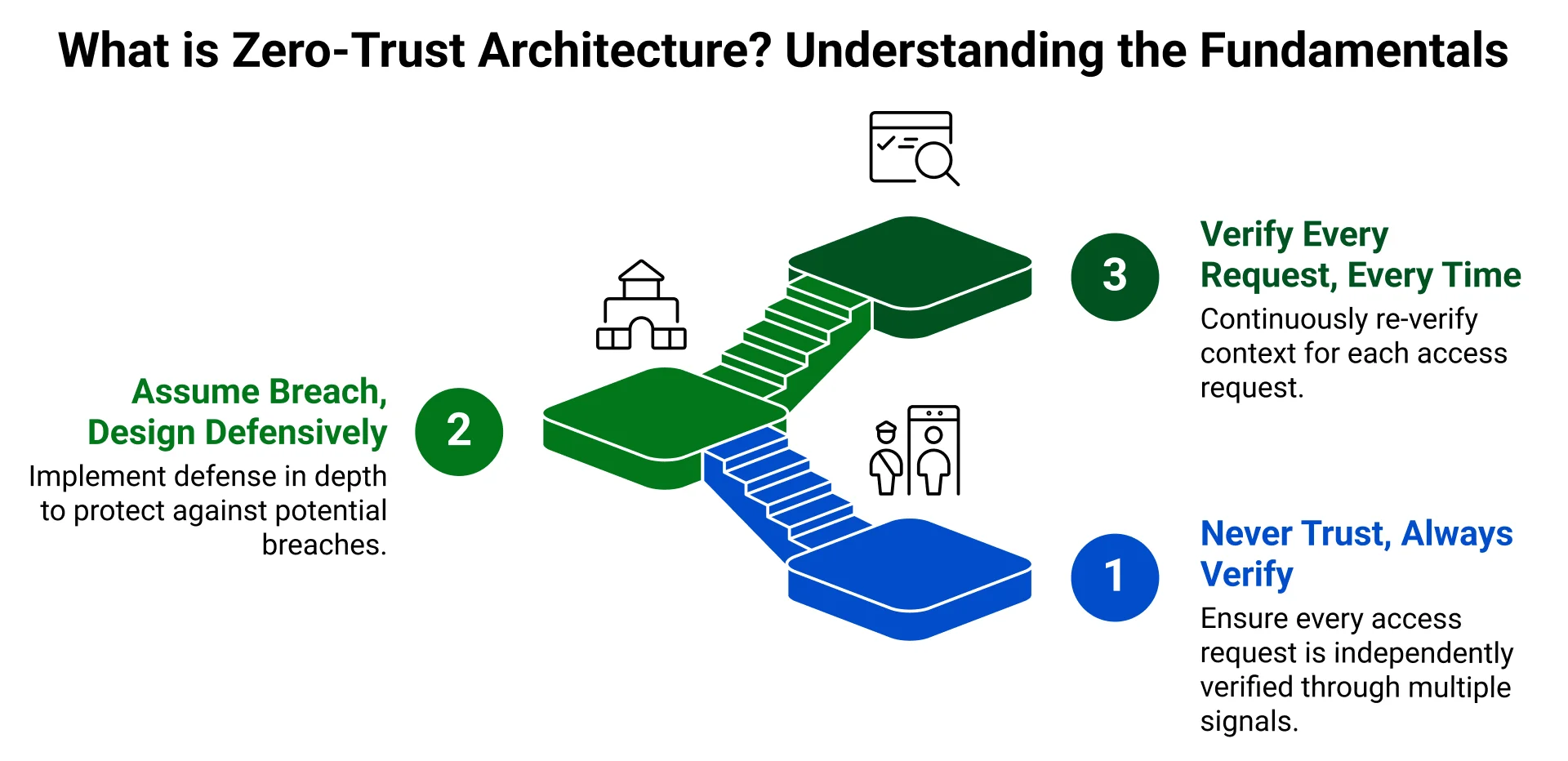
Zero-trust is not a technology, it’s a security mindset built on three core principles:
Principle 1: Never Trust, Always Verify
In zero-trust models, trust is contextual and temporary. Network location alone grants nothing. Instead, every access request, whether from a user, application, or service, must be independently verified through multiple signals: identity, device health, behavior, and context.
In AWS terms, this means:
- Every IAM principal is verified via AWS SigV4 (cryptographic request signing)
- Every API call is authenticated and authorized individually
- Access tokens are short-lived and revocable
- MFA becomes mandatory, not optional
Principle 2: Assume Breach, Design Defensively
Zero-trust assumes attackers already have initial access. Rather than relying on perimeter defense, it implements defense in depth
through:
- Micro-segmentation: VPCs divided into public, private, and isolated subnets
- Least privilege: Each principal has minimum permissions required, nothing more
- Continuous monitoring: Real-time detection of anomalous behavior
- Automatic incident response: Suspicious activity triggers immediate access revocation
Principle 3: Verify Every Request, Every Time
Unlike traditional models that grant broad access after initial authentication, zero-trust re-verifies context continuously. In AWS, this translates to:
- Time-based conditions (deny after business hours)
- Device-based conditions (deny from non-compliant devices)
- Location-based conditions (deny access from risky geographies)
- Behavior-based conditions (deny if access pattern is anomalous)
AWS IAM Policy Hierarchy: How Permission Decisions Work
Understanding how AWS evaluates permissions is critical to implementing zero-trust. AWS evaluates five different policy types, and they work together in a specific way:
| Policy Type | Function | Maximum Effect | Scope |
| Identity-Based Policies | Grant permissions | Allows specific actions | User, Group, Role |
| Permission Boundaries | Set maximum permissions | Limits effective permissions | Individual User/Role |
| Resource-Based Policies | Control resource access | Grants access to resources | Individual Resources (S3, SQS, etc.) |
| Service Control Policies (SCPs) | Organization guardrails | Org-wide permission ceiling | AWS Organizations accounts |
| Session Policies | Temporary restrictions | Further limits token access | Assumed role sessions |
The Permission Evaluation Logic
Here’s the critical concept: AWS grants access only if ALL applicable policies allow it. A single Deny always wins.
Effective Permissions = (Identity-Based AND Permission Boundary AND Resource-Based AND SCPs AND Session Policies)
If ANY policy contains Explicit Deny → Access Denied (regardless of other allows)
Example: Suppose User Raj has:
- Identity-Based Policy: “Allow all S3 actions”
- Permission Boundary: “Allow only S3 and EC2”
- No explicit deny policies
Result: Raj can access S3 (intersection allows it) but NOT RDS, DynamoDB, or IAM (boundary blocks them), even if other policies allow it.
Implementing Zero-Trust: The 5-Step Roadmap
Step 1: Assess Your Current Security Posture (Week 1)
Before implementing zero-trust, establish a baseline.
Actions:
- Enable AWS Security Hub
aws securityhub enable-security-hub
Security Hub aggregates security findings and runs 100+ best practice checks automatically.
- Run AWS Config Rules
- Deploy the iam-policy-no-statements-with-admin-access rule to find overpermissioned policies
- Check for iam-user-mfa-enabled to identify users without MFA
- Audit s3-bucket-public-read-prohibited to find exposed data
- Export Current IAM Policies
aws iam list-entities-for-policy –policy-arn arn:aws:iam::aws:policy/AdministratorAccess
- Map Your Data Sensitivity
- Classify data: public, internal, confidential, restricted
- Identify critical assets requiring strongest controls
- Document compliance requirements (PCI-DSS, HIPAA, GDPR, SOC 2)
Expected Output: Baseline security score, list of policy violations, inventory of privileged accounts.
Step 2: Implement Identity-Centric Access Control (Week 2)
Zero-trust starts with identity verification. Weak identity = weak zero-trust.
Action 2a: Enable MFA Everywhere
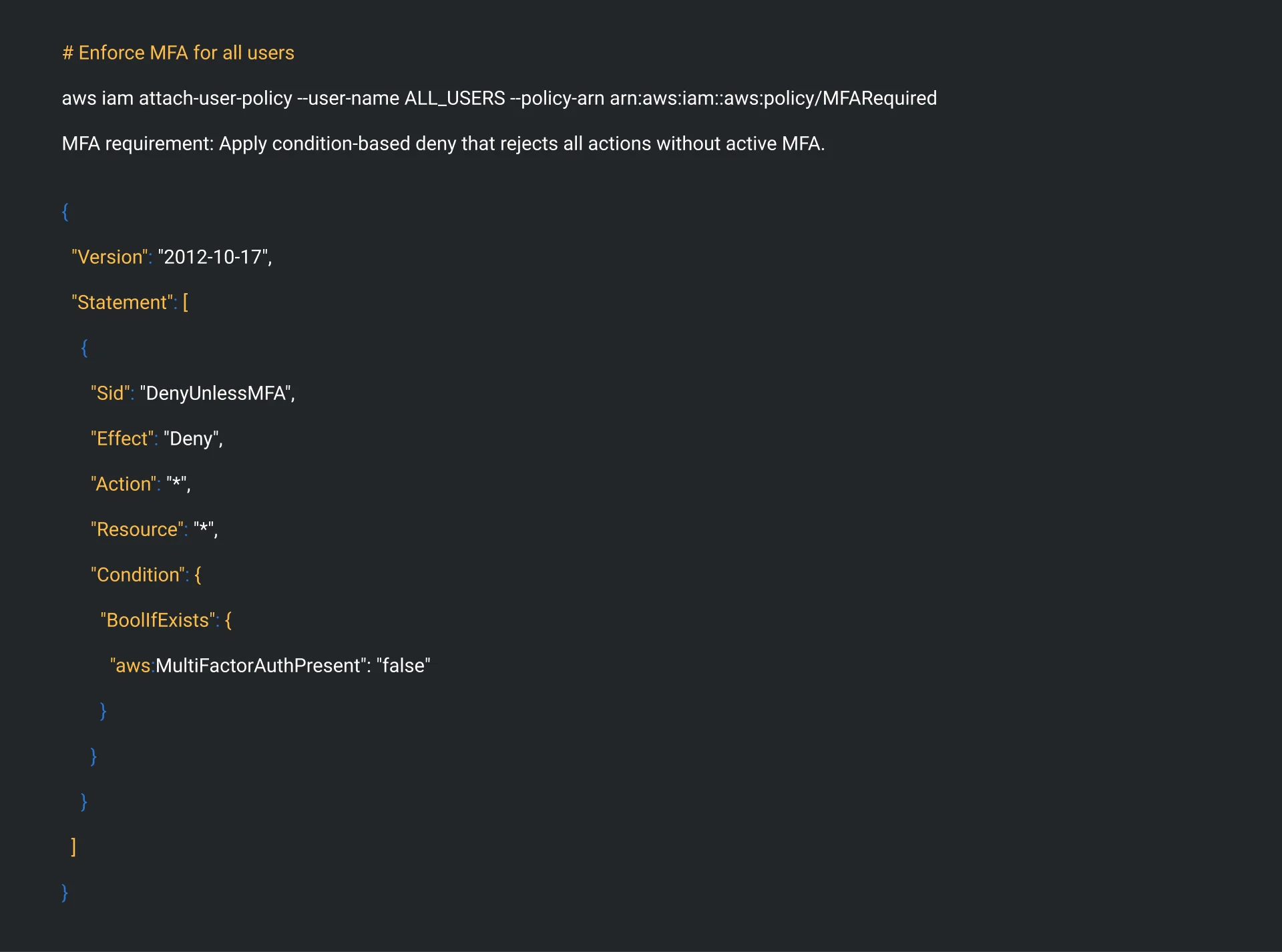
# Enforce MFA for all users
aws iam attach-user-policy –user-name ALL_USERS –policy-arn arn:aws:iam::aws:policy/MFARequired
MFA requirement: Apply condition-based deny that rejects all actions without active MFA.
Action 2b: Implement Centralized Identity with AWS SSO
- Replace individual IAM users with AWS SSO
- Integrate with corporate Active Directory, Okta, or Google Workspace
- Automatic provisioning/deprovisioning when employees join/leave
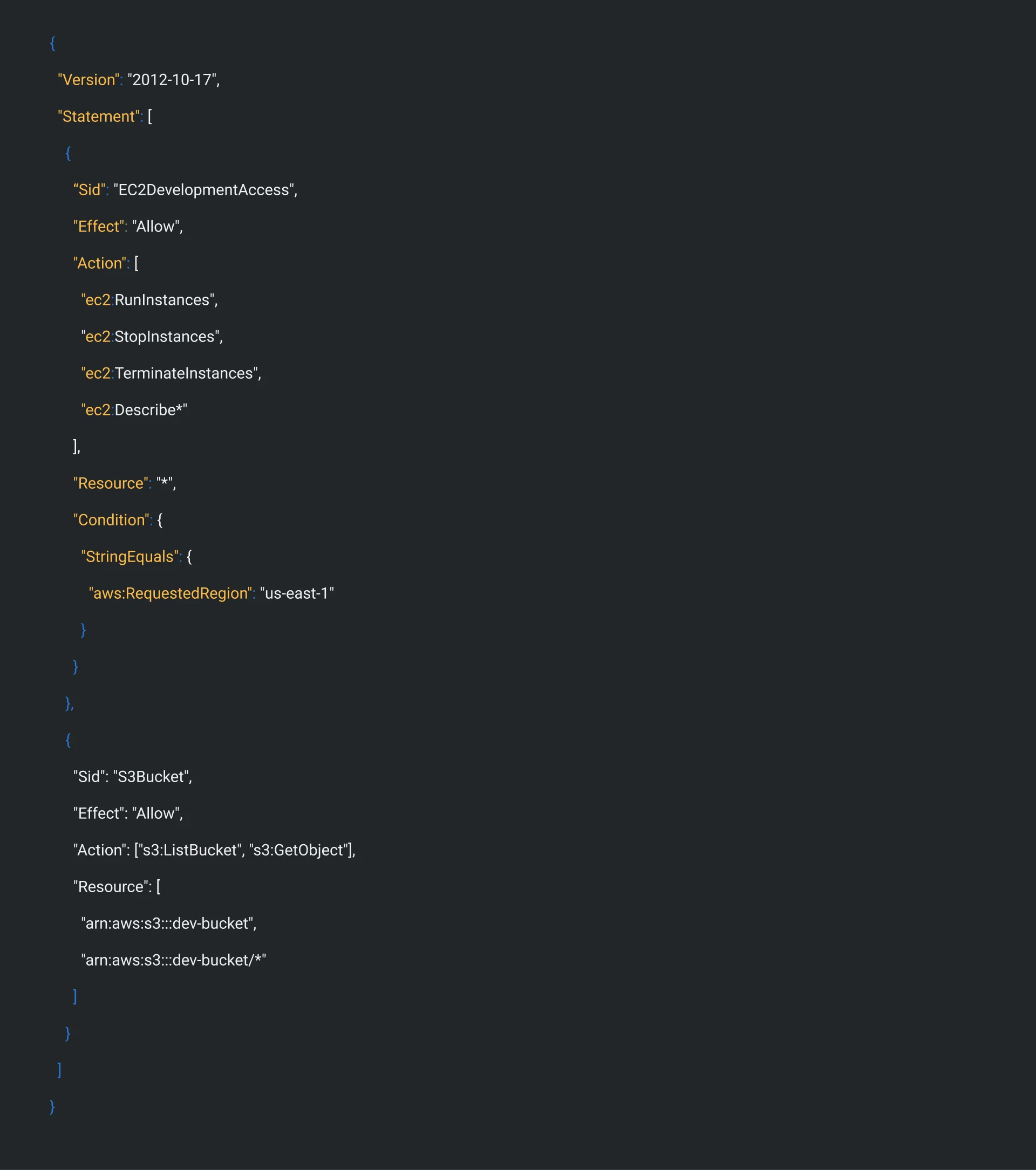
Action 2c: Enforce Least-Privilege Identity Policies Example: Developer role (limited to EC2 + S3 in us-east-1 only)
Step 3: Deploy Permission Boundaries (Week 3)
Permission boundaries are your single most effective tool to prevent privilege escalation. A boundary doesn’t grant permissions, it sets a ceiling on what other policies can grant.
Action 3a: Design Boundary Tiers
Tier 1 (Most Restricted): Read-only to EC2 and CloudWatch
Tier 2 (Developers): EC2, S3, CloudWatch (no IAM)
Tier 3 (DevOps): All compute, VPC, CloudFormation (no IAM, Secrets Manager limited)
Tier 4 (Security Team): CloudTrail, GuardDuty, Config, Security Hub
Action 3b: Create a Developer Boundary Policy
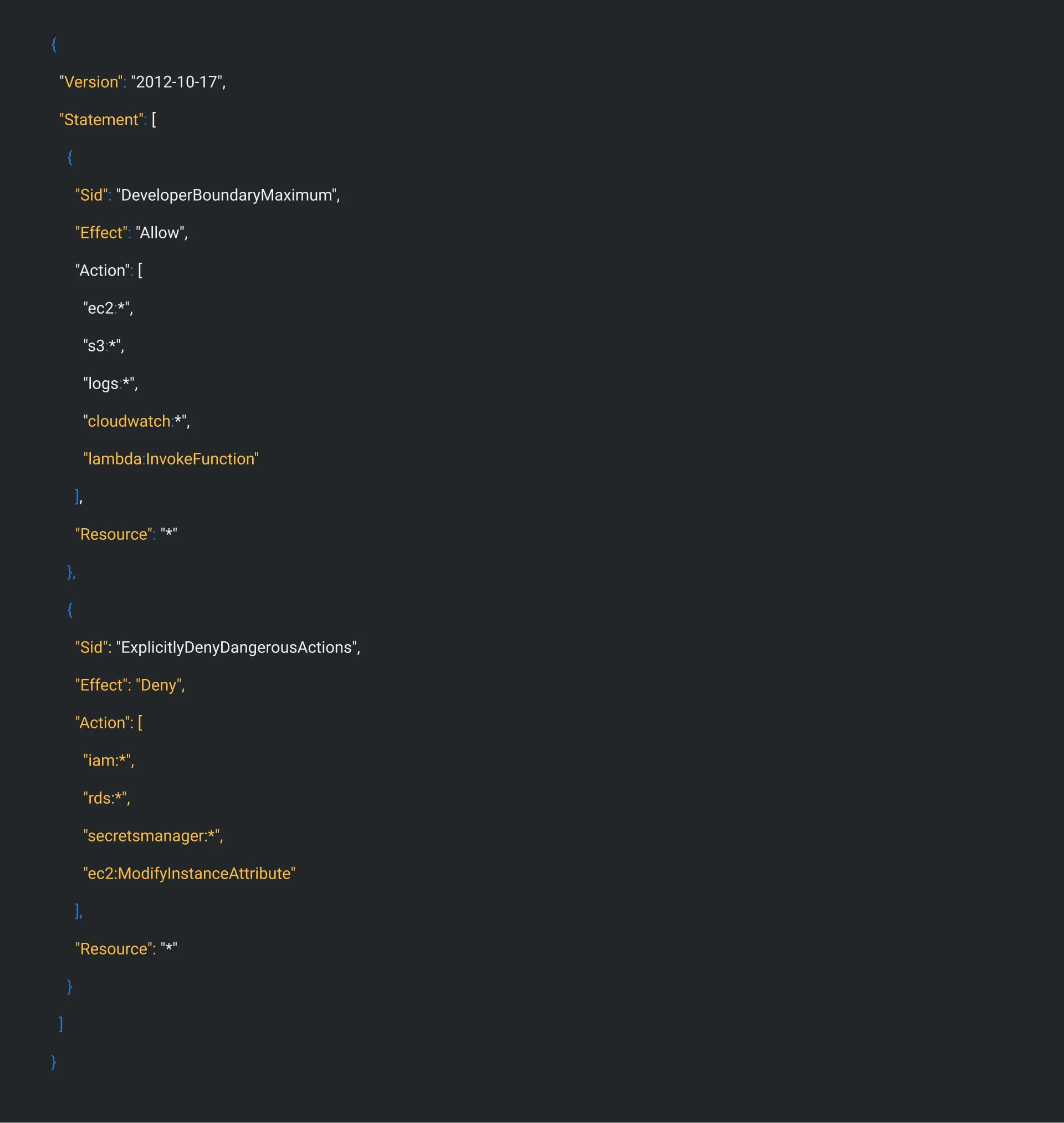
Action 3c: Prevent Boundary Removal (Critical!) Add this policy to admins only:

Action 3d: Test with IAM Policy Simulator
- Simulate: “Can Dev1 terminate EC2 instances?” → Allow (within boundary)
- Simulate: “Can Dev1 create IAM users?” → Deny (boundary blocks)
- Simulate: “Can Dev1 access RDS?” → Deny (boundary blocks)
Step 4: Implement Network Segmentation (Week 4)
Zero-trust doesn’t rely on network perimeter, but network segmentation adds defense depth.
Action 4a: VPC Architecture
Public Subnet: Load balancers only (ALB/NLB)
Private Subnet: Applications (EC2, ECS, Lambda)
Isolated Subnet: Databases, Secrets Manager, Caches
Action 4b: Security Groups (Micro-segmentation)
# Allow traffic only from web tier to app tier
aws ec2 authorize-security-group-ingress \
–group-id sg-app-tier \
–protocol tcp \
–port 8080 \
–source-group sg-web-tier
Action 4c: VPC Endpoints (No Internet Required)
# Force S3 and Secrets Manager access through VPC, not internet
aws ec2 create-vpc-endpoint \
–vpc-id vpc-123456 \
–service-name com.amazonaws.us-east-1.s3 \
–route-table-ids rtb-123456
Step 5: Enable Continuous Monitoring & Auditing (Weeks 4-6, Ongoing)
Zero-trust requires continuous verification. Implement detective controls:
Action 5a: CloudTrail – Complete Audit Trail
aws cloudtrail create-trail \
–name zt-audit-trail \
–s3-bucket-name my-cloudtrail-logs \
–enable-log-file-validation \
–is-multi-region-trail
Every API call logged, immutable, searchable. Compliance auditors love this.
Action 5b: GuardDuty – AI-Powered Threat Detection
aws guardduty create-detector –enable
GuardDuty analyzes CloudTrail, VPC Flow Logs, and DNS logs to detect:
- Unusual API access patterns
- Cryptocurrency mining
- Suspicious network communication
- Compromised credentials
Action 5c: AWS Config – Continuous Compliance Create Config rules:
Rule: iam-policy-no-statements-with-admin-access
Rule: iam-user-mfa-enabled
Rule: s3-bucket-server-side-encryption-enabled
Rule: root-account-mfa-enabled
Action 5d: IAM Access Analyzer – Identify Unused Permissions
aws accessanalyzer start-resource-scan –resource-arn arn:aws:iam::123456789:role/AppRole
Returns list of unused permissions, remove them to tighten zero-trust posture.
Real-World Case Study: Zeta’s Zero-Trust Banking Platform
The Challenge: Zeta provides card issuing and payment processing for banks. Banks require compliance with global regulatory frameworks (Basel III, PCI-DSS, GDPR). Cyber threats are constant.
The Solution: Zeta implemented zero-trust architecture on AWS covering:
- Identity Layer: AWS IAM + IAM Identity Center (centralized authentication)
- Network Layer: VPC segmentation + private endpoints
- Detection Layer: AWS Security Hub + GuardDuty + CloudTrail
Key Implementation Details:
- Permission boundaries applied to all developer roles (prevented privilege escalation)
- Explicit deny policies prevented cross-account access without approval
- GuardDuty continuously monitored for suspicious access
- AWS Security Hub automated 280 of 300 compliance controls
Results (3-Month Impact):
- Compliance speed: 45% faster (280/300 controls automated)
- Customer satisfaction: 92-94% compliance needs addressed out-of-box
- Security incidents: Zero privilege escalation attempts
- Time to authorize customer: Reduced by 40%
Quote from Zeta CTO: “Zero trust is more than a model; it’s a mindset. With AWS’s extensive security services and rigorous identity verification, we provide a strategic advantage against threats while maintaining compliance with the most stringent requirements.”
Key Takeaways: Your Zero-Trust Checklist
✓ Implement MFA everywhere – Deny all actions unless MFA is active ✓ Deploy permission boundaries – Prevent privilege escalation at the IAM level ✓ Use explicit denies strategically – Override any overpermissive allow policies ✓ Segment networks – Public/private/isolated subnets with security groups ✓ Monitor continuously – CloudTrail, GuardDuty, Config, IAM Access Analyzer ✓ Test before deploying – Use IAM Policy Simulator for all policy changes ✓ Audit regularly – Review access logs, rotate credentials, remove unused permissions
Next Steps: Start Your Zero-Trust Journey Today
- This week: Enable AWS Security Hub and run baseline assessment
- Next week: Enable MFA for all users, implement AWS SSO
- Week 3: Design and deploy permission boundaries
- Ongoing: Monitor with CloudTrail, GuardDuty, Config
Want more AWS security content? Visit to our blog or contact us for a security assessment.

Nihal Rajput is the Operations Director at Ficode Software Solutions Pvt. Ltd., where he oversees day-to-day operations, streamlines processes, and drives organisational efficiency. With a focus on delivering scalable solutions and maintaining operational excellence, he plays a key role in aligning teams, optimising resources, and ensuring client satisfaction as the company grows.

 Previous
 Next
Next