


Jan
API Integration Mistakes and How to Avoid Them

Starting an API integration might seem straightforward, but without careful planning, it can quickly turn into a nightmare. From unexpected downtime to security breaches, API integration mistakes can disrupt workflows, frustrate users, and cost businesses significant time and money.
By understanding the most common pitfalls and following API integration best practices, you can ensure a smoother, more reliable implementation that scales with your business.
In this guide, we’ll cover the key API integration mistakes, how to avoid them, and strategies to keep your integrations secure, efficient, and maintainable.
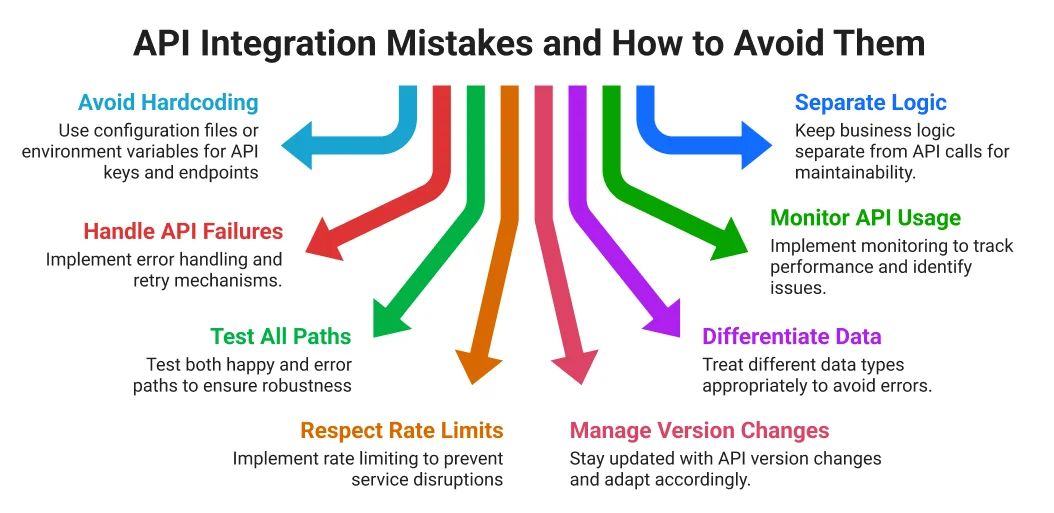
1. Hardcoding API Keys and Endpoints
One of the most frequent API integration mistakes is hardcoding credentials or endpoints directly into your code. While it may seem convenient during development, it’s risky. Exposed keys can lead to data breaches or unauthorized usage, while hardcoded endpoints make switching environments or updating APIs cumbersome.
Best Practices:
- Store credentials in environment variables or a secure secrets manager.
- Separate development and production keys.
- Rotate keys regularly and update documentation.
- Avoid hardcoding API endpoints; use configuration files or environment variables instead.
2. Ignoring API Failures
Assuming APIs will always work is a recipe for trouble. Downtime, network issues, and rate limits are realities you need to account for. Poor error handling can result in crashes, blank screens, or cryptic messages for users.
How to Avoid This Mistake:
- Assume all API calls can fail.
- Implement retry logic with exponential backoff.
- Handle different HTTP status codes appropriately.
- Log errors for debugging and alert your team proactively.
3. Testing Only the Happy Path
Testing your integration only under ideal conditions is a common source of common API errors. Production environments are unpredictable, and APIs may respond slowly, return unexpected data, or hit rate limits.
Effective Testing Strategies:
- Simulate slow responses and network delays.
- Validate edge cases and unexpected data formats.
- Test rate limits and concurrency scenarios.
- Use staging environments and automated testing tools like Postman, Jest, or Mocha.
4. Overlooking Rate Limits
APIs have request limits for a reason. Ignoring them can lead to throttling, errors, or complete downtime when your user base grows.
How to Avoid Rate Limit Issues:
- Read API documentation carefully.
- Implement request queuing and caching where possible.
- Use batch endpoints instead of multiple individual requests.
- Monitor API usage and configure alerts for unusual activity.
5. Neglecting API Version Changes
APIs evolve. Endpoints get deprecated, response formats change, and new features are introduced. Treating APIs as static is one of the biggest API integration mistakes.
Best Practices:
- Subscribe to provider changelogs and developer newsletters.
- Pin specific API versions in your code.
- Test new versions in staging before deploying.
- Update internal documentation with version changes.
6. Treating All Data the Same Way
Different APIs return data in varying formats—dates, strings, objects, and arrays might differ across endpoints. Failing to normalize this data leads to maintenance headaches and unexpected bugs.
How to Standardize Data:
- Transform external data into your internal format immediately.
- Validate data with schema tools like Joi or Yup.
- Handle null and undefined consistently.
- Document your data transformation rules and write tests for them.
7. Flying Blind Without Monitoring
Not monitoring API usage is like driving blind. Without logging and alerts, troubleshooting performance issues or failures becomes tedious and slow.
Monitoring Tips:
- Log all API requests and responses securely.
- Track response times and error rates.
- Use monitoring tools like Datadog, New Relic, or CloudWatch.
- Review logs regularly and configure proactive alerts.
8. Mixing Business Logic with API Calls
Combining business logic with API calls makes integrations inflexible and hard to maintain. If you need to switch providers, a tangled codebase leads to long, error-prone rewrites.
Separation Best Practices:
- Keep API calls in a dedicated service layer.
- Decouple business logic from integration code.
- Make integrations swappable and testable in isolation.
Final Thoughts
Avoiding API integration mistakes isn’t about luck—it’s about planning, discipline, and following proven API integration best practices. By prioritizing security, testing thoroughly, monitoring performance, and separating business logic from API calls, businesses can ensure integrations are stable, scalable, and maintainable.
At Ficode, we’ve helped numerous companies implement seamless API integrations by focusing on structured planning and best practices from day one.
If you’re about to start an API integration project or want expert guidance to avoid costly errors, Ficode’s team can help. Contact us today to build secure, reliable, and high-performing integrations tailored to your business needs.

Nihal Rajput is the Operations Director at Ficode Software Solutions Pvt. Ltd., where he oversees day-to-day operations, streamlines processes, and drives organisational efficiency. With a focus on delivering scalable solutions and maintaining operational excellence, he plays a key role in aligning teams, optimising resources, and ensuring client satisfaction as the company grows.

 Previous
 Next
Next